Setting up LDAP
Lightweight Directory Access Protocol (LDAP) is an object directory that is commonly used for centralized authentication, commonly known as Single Sign on (SSO). Many small through to large-scale organizations have an LDAP implementation.
By setting up the LDAP Integration within DontManage, you will able to login to your dontmanage app by using your LDAP credentials.
1. Configuring
Many of the fields that are on the LDAP Settings page are mandatory. These fields will be easily distinguished below by being in bold font.
When configuring LDAP Settings, and the 'enabled' check box is checked. DontManage will validate the data you have entered into the fields. If any appear to be invalid, the settings won't save and you will be presented with an error message. Once you have corrected any errors, you will be able to successfully enable LDAP authentication.
The LDAP Settings configuration page has been broken down into smaller sections. Please see the headings below, on how to configure each section.
To setup LDAP, Navigate to:
Home > Integrations > LDAP Settings
:memo: Reminder |
|---|
Don't forget to 'check' the enable box at the top of the page once you have entered your settings into the configuration page. |
1.1 LDAP Server
DontManage has been tested with both OpenLDAP and Active Directory. However any standards compliant LDAP Directory could be used as the LDAP authentication source.
LDAP Directory Server: (drop-down) Select the option that matches your LDAP Directory. Available options are:
Active Directory for Microsoft Active Directory
OpenLDAP for OpenLDAP
Custom Select this option if you need to adjust the LDAP Group attributes. i.e. your setup for LDAP groups are
groupofnamesoruniquegroupofnamesetcLDAP Server URL: This is the URL to your LDAP Server. Must be in the form of
ldap://yourserver:portorldaps://yourserver:port
1.2 LDAP Authentication
This section contains the details of the user that will bind to the directory server.
Base Distinguished Name (DN): This is the user that will bind to LDAP. This user requires permission to view the search paths that you enter below.
Password for Base DN: This is the password for the user above, that is used to look up user details on your LDAP server.
1.3 LDAP Search Paths
This section is the searh paths for each of the LDAP Directory objects. Any LDAP container object path can be used as long as it is in LDAP FDN (Full Distinguished Name) format. i.e. ou=my dontmanage objects,dc=example,dc=com. Any paths provided here require that the bind user has access to read and write to.
Write access is required for the bind user so that end users can reset their passwords.
LDAP search path for Users: This is the search path that all users in your LDAP server must be part of to be able to log into a dontmanage app.
LDAP search path for Group: This is the search path that all groups in your LDAP server must be part of to be able to log into a dontmanage app.
LDAP Search String: This field allows dontmanage to match the user/email entered in the dontmanage login screen, with the LDAP Server. For example, you could use email address, or username depending on your preference.
You can use complex LDAP search filters here as long as they contain the login name placeholder
{0}and are enclosed in braces(). This is placed inside the search filter where you would like to match the login name. Any filter the ldap3 python module and that your LDAP directory supports should work. examples include:(uid={0})(SamAccountName={0})- (Active Directory)(&(description=*ACCESS:DontManage*)(uid={0})- using a filter description in OpenLDAP allows filtering similar to Active DirectoriesmemberOfas it will only select users who haveACCESS:DontManagein the description field.(&(SamAccountName={0})(memberof=cn=Domain Users,ou=Groups,DC=example,dc=com))- (Active Directory)
1.4 LDAP User Creation and Mapping
This section contains the LDAP attributes that will be read from the directory server to map against the dontmanage user.
LDAP Email Field: Specifies the LDAP attribute that contains the email address of the user.
mailis the common LDAP attribute to use.LDAP Username Field: Specifies the LDAP attribute that contains the username of the user.
sAMAccountNamefor Active Directory anduidfor OpenLDAP.LDAP First Name Field: Specifies the LDAP field that contains the first name of the user.
givenNameorsnis commonly used.
There are many other non-mandatory LDAP attributes that you can use to map to the dontmanage user. They are:
Middle Name
Phone
Mobile
SECURITY WARNING Understand that if you use the LDAP attribute
1.5 LDAP Security
This section is optional. However if you would like to configure a secure connection to your directory server, this where you enter the TLS connection details.
In the LDAP Settings area, there are two dropdowns.
SSL/TLS Mode - set this to StartTLS to connect to your LDAP server using StartTLS. If your LDAP server does not support StartTLS, setting this to StartTLS will result in an error
StartTLS is not supported. Check the configuration on your LDAP server if you receive this error.Require Trusted Certificate - if you change this to
Yesthen the certificate provided by the LDAP server must be trusted by the DontManage server.Noit is not recommended to use this setting as it bypasses ensuring the certificate is signed by a trusted certificate authority.
If you would rather use StartTLS with a self-signed (untrusted) certificate, set this to No. If you do not use StartTLS, this setting is ignored.
SSL/TLS Mode
Specifies whether you want to start a TLS session on initial connection to the LDAP server.Require Trusted Certificate
Specifies if you require a trusted certificate to connect to the LDAP serverIf you are specifying a trusted certificate, you will need to specify the paths to your certificate files. These files are to be placed on your dontmanage server, and the following fields should be an absolute path to the files on your server. The certificate fields are:
Path to private Key File
Path to Server Certificate
Path to CA Certs File
To configure your DontManage Instance to accept certificates signed by your own 'Certificate Authority' or a 'self-signed certificate', please consult your Operating Systems documentation on how to add a 'Certificate Authority' / 'self-signed' certificate to your 'Trusted Certificates store.'
1.6 LDAP Custom Directory
This section is mandatory if you select custom directory server. There are only two options available here and they pertain to the groups that your directory server uses. They are:
Group Object Class This is the object class of the groups within your directory server.
Group Member Attribute This is the LDAP Attribute within the group that contains the common name (CN) of the user.
Custom Group Search This can be used to specify a custom LDAP Custom Group Search which is necessary for some LDAP providers.
1.7 LDAP Group Mapping
This section contains the details for mapping the LDAP Groups. Any group the user is a member of will be mapped to the specified dontmanage role(s).
DontManage Feature: if you have configured group mapping. Each time a user logs on, their roles are checked and added/removed as required.
Default Role on Creation: When the user is created in your dontmanage app, they will be assigned with this default role.
LDAP Group Mappings Table You can map mutiple LDAP groups to DontManage roles. Entry of the LDAP group must match the LDAP
cnattribute. i.e. 'Domain Users' not 'cn=Domain Users,ou=Groups,dc=example,dc=com' which is a LDAP FDN entry.Example
No
LDAP Group
Role
1
Domain Users
Guest
2
Domain Administrators
Administrator
LDAP Group Field (depreciation WARNING) This is the LDAP Attribute within the user LDAP object that contains the list of groups the user is a member of. If you have configured all of the settings as per above, this setting will have no effect. This field exists purely for those who configured LDAP prior to the current layout. This field will be removed in a future version of DontManage.
2. Log in to dontmanage with LDAP
After setting up and enabling LDAP, on the login screen, the system enables Login Via LDAP option.
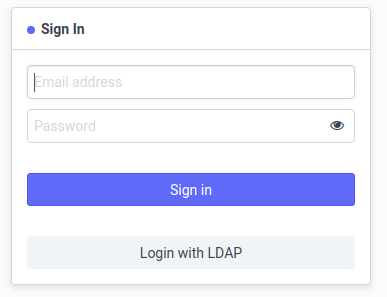 Figure 1. DontManage app login screen when LDAP has been configured and enabled.