Architecture
DontManage Framework is a full-stack web based framework and it includes all the tools needed to deploy a site into production. Database, caching, background jobs, realtime notifications, etc are all configured when you set up a DontManage site.
DontManage framework is based on Python, so it uses the virtualenv to setup
isolated environments for multiple Python versions. You can also use it to
deploy sites with different DontManage versions.
The following diagram closely resembles the dontmanage-bench directory structure
and its interface with different parts of the stack.
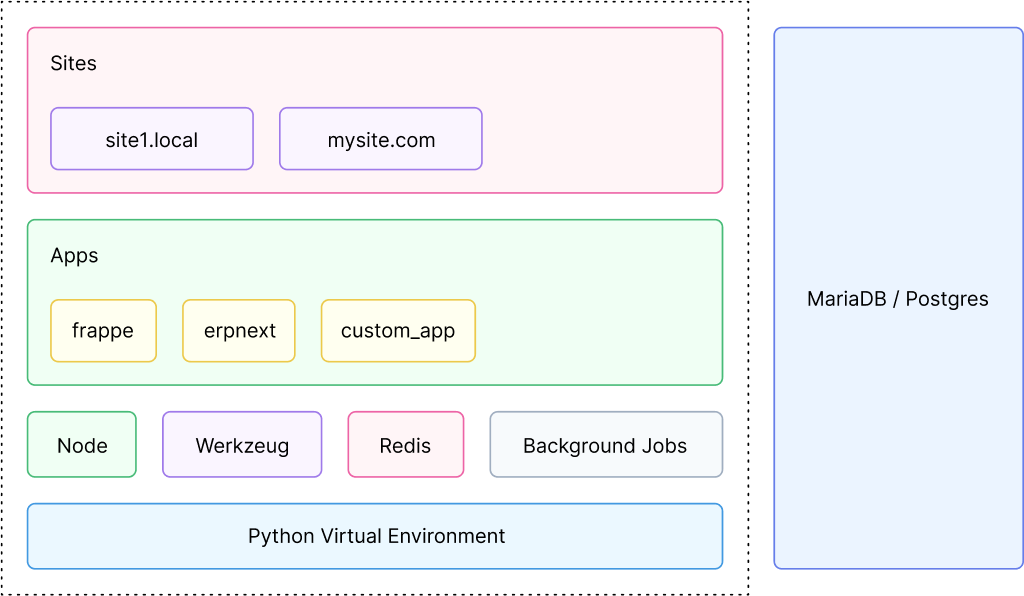 Architecture
To setup a DontManage based site, you need to first install Bench. If you haven't installed it already, check out the Installation page.
You can create a new dontmanage-bench setup by running the following command:
bench init dontmanage-bench
This command will do the following:
- Create a directory called
dontmanage-benchanddontmanage-bench/sites,dontmanage-bench/appswithin it. - Setup a python virtual environment under
dontmanage-bench/env. - Create a
dontmanage-bench/configfolder to store redis configuration files. - Download
dontmanageapp andpip installit. - Install node packages.
- Build JS/CSS assets.
Each dontmanage-bench setup spawns it owns web, redis and node processes.
 Architecture